

↓ Skip to main content
  1. Blog/

Changing "message:" protocol handler from Sparrow back to Mail.app

·114 words·1 min·
Diego Zamboni
Author
Diego Zamboni
After using Sparrow for a while, I have decided to switch back to Mail.app. However, even after setting my default email client to Mail.app, all my message: links (for example, from messages dragged from Mail.app into Things) were opening in Sparrow.

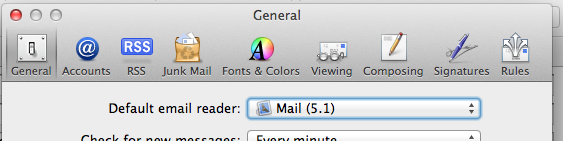
After some experimentation, I figured out what happened: I switched the default email client from Sparrow to Mail using Mail's preference panel:
Pastedgraphic-1

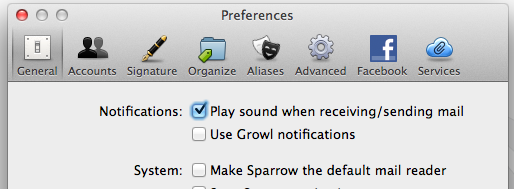
Apparently this switches the application for the mailto: protocol, but not for message:, nor for .eml files. The solution was to use Sparrow's preference panel to set it again as the default email client, and then disable it. Then Sparrow correctly sets all the protocol handlers back to their default values.

Pastedgraphic-2

Share this article

Fast translation with Google Translator

·56 words·1 min
via https://medium.com/@mrdoro/fast-translation-with-google-translator-and-mac-osx-817e32233b7a https://medium.com/@mrdoro/fast-translation-with-google-translator-and-mac-osx-817e32233b7a Nice article about how to create a service to automatically translate selected text from any application. I use this all the time, I have a “German-to-English” service bound to Command-Alt-Ctrl-Shift-E, so I can just select text off the screen, press the shortcut, and a window with the translation will pop up. Very handy.

Fixing Emacs problems with the fish shell

·114 words·1 min
I started getting errors from the TRAMP Emacs package because I was using fish as my default shell, and it does not recognize certain standard syntax elements (such as && to separate commands), and Emacs runs subcommands under the default shell. I fixed this by: