
My history of task management applications…
Since I started using GTD a few years ago, I have used several applications for the computer-based side of my task management (which is where almost everything else eventually ends up). In chronological order, I have used:
- The standard applications on my (aging) Palm device together with JPilot on the desktop (Linux) side, following the PigPog method for connecting actions to projects. This worked fine for the most part, but required a lot of manual rearranging of things. At some point I found…
- ThinkingRock, which is the most faithful-to-GTD application out there. It strictly enforces the GTD workflow. This was my preferred application until I moved from Linux to a Mac as my work machine. I still consider ThinkingRock to be one of the best applications out there, but since it is written in Java, it does not integrate all that well into the Mac environment, so I decided to search for more Mac-like options.
- iGTD is one of the most popular GTD applications for the Mac. It shines in the integration department! Its F-key trick allows the use of a single key (F6 by default) to automatically create a new task containing the currently selected object (depending on the application – Safari URL, Mail message, selected text in an editor, etc.). I found a script to migrate from ThinkingRock to iGTD, so I was able to migrate quickly. Unfortunately, iGTD (at least iGTD 1.x, I have not tried the 2.x alpha) has many lackings in terms of GUI design. Some panels are arbitrarily not-resizable, and in general it feels very complex. I never “clicked” with iGTD, so I kept looking for alternatives.
…and the present: Things
 Which brings me to the latest application in my toolbox: Things. Things’ strength is its simplicity. It has very little built-in structure, allows you to use tags extensively, and it is visually very pleasant.
Other people have already written excellent full reviews of Things, so instead of doing one more full review, I want to write about the aspects that have made Things particularly useful to me.
1) Little imposed structure: Inbox, Time-related focus, projects and areas of responsibility:
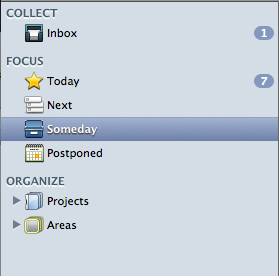 This subdivision is the only fixed structure that Things will impose upon you. Inbox is where you collect your stuff as it appears (although you can also file it directly in some of the other areas), Today is where tasks that you have marked as “must do today” appear, Next is where all your future tasks are listed, Someday are things that you have left for some undefined time in the future (this is GTD’s “Someday/maybe” list), and Postponed is things that you have left for some defined time in the future (this is an electronic tickler file).
Projects and Areas allow you to group your tasks into Projects (related sets of actions that correspond to a particular objective, that in the end can be marked as completed) and Areas of responsibility (ongoing areas of interest which may never be completed). Things is the only GTD program I have seen that handles Areas, and I find them incredibly useful in the following ways:
- I try to make sure that every task and project I create fits in one of the Areas I have defined. These are supposed to be all the “high-level functions” in my life, and if one task does not fit in any of them, then either the task is unimportant or there is an area that I have overlooked so far. Areas cover everything for both work (”Write papers”, “File patents”, “Research”) and personal life (”Family life”, “Health”, “Home and car maintenance”), as well as areas that cover both work and personal items (”IT infrastructure maintenance”, “Blogging”, “Productivity”).
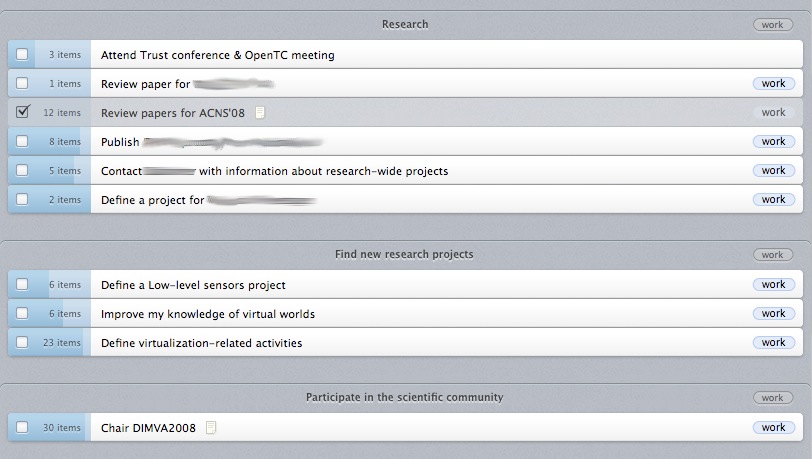
 I find them very useful for doing my weekly review. For me, Areas are what David Allen would call “larger outcomes”, and so I go through the list, ensuring that I am doing something on each of those areas. I do the same for projects. Things has very nice overview screens for both Projects and Areas, in which you can see how many items you have in each one of them, and for projects, gives you an indication of their level of completion (how many of the tasks in the project have been marked as done). One nice feature is in that you can navigate these overview screens using the keyboard to select a project/area, and you can use the Right-arrow key to view the items it contains, and then Left-arrow to go back to the overview. Using the keyboard, it is very easy and efficient to review all the areas and projects.
2) Tagging: create your own structure:
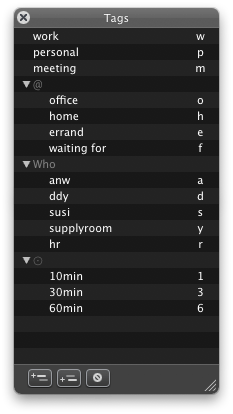 I find tags incredibly useful. I use tags for the following purposes:
- General areas: work, personal and meetings (I keep track of meetings in Things, but I don’t want to see them all the time, so I define a different tag for them)
- Traditional GTD contexts (home, office, errand, waiting for)
- People agendas (my boss, my wife, other specific people or places)
- Time indicators of how long the task will take to complete (I use only 10, 30 and 60 minutes).
Using the Things tag bar, you can quickly filter any of the views to see only the appropriate tasks. You can assign one-key shortcuts to tags, so you can quickly add and remove tags to tasks by pressing them while the task is selected. You can also apply tags to projects and areas.
One thing that I wish Things would implement is persistence in the selection of tags. As it is now, if I do my tag selection in the “Today” view and then switch to “Next”, when I go back to “Today” all the tasks are shown again, and I have to re-select tags. It would be nice if each view remembered the set of tags that were last selected. Even nicer would be to allow creation of custom views, based on any of the preexisting ones, but with a certain set of tags always pre-selected.
3) System integration and quick entry:
Things allows you to set a system-wide hotkey to invoke its quick-entry dialog, where you can enter a task, and optionally specify tags, type some notes, and decide where to file it (it goes in the Inbox by default).
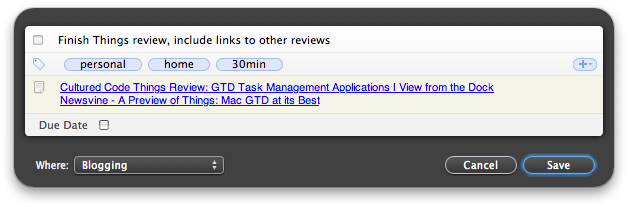 One feature that I find very useful is the ability to drag any link into the notes field, and Things will recognize it correctly. This obviously includes URLs from Safari, but you can also drag email messages, files or folders, and Journler entries. This makes it possible to have at your disposal any relevant information you need to do it. When you click on the links, the corresponding item in the correct program will open.
There are some applications from which you cannot drop links into Things tasks, one notorious example is AddressBook. I think this is because when you drag an entry from AB, it gives you not a link, but actually a copy of the record. This is controlled by AB, but I think it would be very useful if Things somehow recognized this and did the right thing by creating a link to the correct AB entry.
4) The development team:
This is something that has impressed me very positively from the start – the Things development team is incredibly friendly, and goes to great lengths to stay in touch with the users, to get their feedback, and to provide them with information about what is going on. When the Things alpha program started (in which I was lucky to get quite early), they had only a wiki for users to enter their experiences and for them to provide information. Pretty soon they added a blog, some time later they added a feedback window built into Things, then they started a Twitter feed to keep users updated of the latest developments, and just yesterday they announced the forums. And it’s not just that they create these mechanisms – they actively participate in them, and give us detailed information about what is happening on their side. One great example is this blog post in which they describe the evolution of their “recurring task” dialog, their design criteria, and show all the different attempts until they found the perfect one. Very rarely does one get to see this “behind the scenes” process, and to me it inspires trust that these guys really care about their users, and really want to make their product a good one. They are building a very nice user community, and this is one of the best things to which a software product can aspire.
Loose ends
Another nice thing is that the Things database is stored as an XML file. Although I have not played with it much yet, this should make it relatively easy to do interesting things with it, such as displaying it online, formatting for different purposes using XSL transformations, or maybe even automatically augmenting it with information collected from different places.
So what’s missing from Things at the moment? Notably:
- Printing (you can print, but the results are not pretty)
- iCal/iSync synchronization. This is essential – with iGTD I was able (for example) to create a new task on my cellphone, and have it synchronized back to iCal and from there to my Inbox for processing. It would be nice to have this ability back.
- Things is not completely navigable using the keyboard – for example, there is no shortcut for creating a new project, and you can’t even assign one using the system-wide Keyboard shortcuts facility in the Keyboard preference panel, because there is no menu entry for that action, it exists only in an action menu inside the Things window.
- No AppleScript support yet, that I can tell. This is really important for even better integration with the rest of the system.
Conclusion
I really like Things. I had to develop a certain amount of discipline to maintain the appropriate tags, but once I got used to it, Things became an integral part of my workflow. It ties nicely with all the main applications I use (Mail, Safari, Journler), it is beautifully designed, and the development team is responsive and open. I have used it exclusively as my task management application for almost three months, and I am still excited by it and its possibilities.
19 responses so far ↓
1 Custom PC’s News: Personal Tech.. » The PC Info // Feb 24, 2008 at 10:15 am
[...] The evolution of task management (Things review) My history of task management applications? Since I started using GTD a few years ago, I have used several applications for the computer-based side of my task management (which is where almost everything else eventually ends up). In chronological order, I have used: The standard applications on my (aging) Palm device together with JPilot on the desktop (Linux) side, following the PigPog method for connecting actions to projects. This worked fine for the most part, but required a lot of manual [...]
2 Rachel Murphy
// Feb 24, 2008 at 12:35 pm
Rachel Murphy
// Feb 24, 2008 at 12:35 pm
Excellent review. I also really like the “areas” feature of Things. Sometimes you have projects that are neverending – such as maintaining finances or looking after the garden. None of the other GTD apps I have tried have been able to implement areas of responsibility as effectively as Things does.
3 Amir
// Mar 4, 2008 at 3:35 am
Amir
// Mar 4, 2008 at 3:35 am
Interesting. I didn’t know you could drag items into the notes field.
It sounds really useful but just isn’t working for me. (Things 0.8.7 on 10.4.11 – PPC)
4 Hitchhiker
// Mar 4, 2008 at 7:54 am
Hitchhiker
// Mar 4, 2008 at 7:54 am
Amir – What is not working? Dragging links into the Notes field? What have you tried to drag?
In any case, I would suggest mentioning your problem in the Things forums (http://culturedcode.com/things/forums/).
5 roblef dot com » Blog Archive » links for 2008-03-19 // Mar 19, 2008 at 1:28 am
[...] The evolution of task management (Things review) another “things” positive (tags: applications mac gtd things productivity) [...]
6 sharley
// May 12, 2008 at 7:08 pm
sharley
// May 12, 2008 at 7:08 pm
Great article. I’ve been using a new product called MproLite: http://www.managepro.com/products.htm
It seems to be designed and directly focused on three key questions from a business perspective:
Where are we going (with scorecards)
What are we doing to get there (outline of tasks, progress updates and attached document)
What needs to happen today
More personally it’s about having a tool that:
keeps you organized and focused on what’s priority…
the peace of mind I get from having everyone in one place, at your finger tips,
the extra kick in productivity, the reduced frustration that comes from having to search for stuff.
Something that’s pretty simple to use, but has a lot of flexibility to wrap around your business process so that its simplicity doesn’t get in your way after a few days or weeks and start to feel like more and more of a limitation.
Task management, varies in value creation based upon whether it is personal (personal organization, peace of mind) or business (coordination of work effort, team members, delivery of projects, meeting of defined goals and outcomes) oriented.
As I start planning each day, I ask myself this question “What’s important to move the business forward”. I can easily see who’s doing what, when and move on to prioritizing in a way that keeps me focused on keeping the business moving and less distracted with tasks that don’t necessiarly help me meet this objective.
7 Rohan
// May 20, 2008 at 5:27 am
Rohan
// May 20, 2008 at 5:27 am
i prefer a web based app http://www.statuswiz.com
8 How to use Things on two accounts on the same machine // May 23, 2008 at 12:17 pm
[...] am a big fan of Things, the very nice task manager from Cultured Code. I keep both personal and work-related [...]
9 Craig
// May 23, 2008 at 5:35 pm
Craig
// May 23, 2008 at 5:35 pm
Hey , That’s a nice idea to use Things across two accounts on the same machine! I have that issue on my Mac as well.
10 Craig
// May 23, 2008 at 5:59 pm
Craig
// May 23, 2008 at 5:59 pm
Thanks for the review and the tip on dragging items into the Note field. I love Things but I am still discovering some things about it because it was so easy to just using that I never read any directions on it. I have tried at least a little bit just about everything else out there for the Mac. Things is still evolving for me as I think about my system of tags. That seems to be where Things either comes together in GTD or falls apart into just a to-do list program. ThinkingRock is still on my machine to remind me of the rigorous GTD system. I don’t actively use it. I do still actively use the Mac only GTD system of scripts “Ready-Set-Do!” by Todd Vasquez http://homepage.mac.com/toddvasquez/Ready-Set-Do!/Personal93.html
It Comprehensively integrates all of your files and programs into David Allen’s GTD workflow without locking you into a particular program. So I go back and forth between these scripts which help me practice the GTD system with little effort and the program Things which thanks to the above tip I can use on my other account on the same system. I think over time Ready-Set-Do! will help me work out how I will use Things tag system.
I also strongly recommend Neil Fiore’s book to any GTD enthusiast, “The Now Habit: A Strategic Program for Overcoming Procrastination and Enjoying Guilt-Free Play”
11 Hitchhiker
// May 24, 2008 at 7:40 am
Hitchhiker
// May 24, 2008 at 7:40 am
@Craig: thank you for the comment. I have not looked at Ready-Set-Do!, but it certainly looks interesting – I might have to try it out.
12 ToDo app Things is the bomb at Tobias Buckell Online // Oct 8, 2008 at 12:52 pm
[...] a review here, here, and here that cover in depth my same reasons for liking [...]
13 Pauletta
// Nov 27, 2008 at 11:12 am
Pauletta
// Nov 27, 2008 at 11:12 am
I have looked at the script.,
14 jauhari
// Nov 27, 2008 at 12:42 pm
jauhari
// Nov 27, 2008 at 12:42 pm
It's look like promising tools I want try this
15 jauhari
// Nov 27, 2008 at 12:42 pm
jauhari
// Nov 27, 2008 at 12:42 pm
Free?
16 Mike
// Dec 11, 2008 at 3:05 pm
Mike
// Dec 11, 2008 at 3:05 pm
The problem with GTD products I’ve used is that a lot end up not being supported… e.g. Thinking Rock doesn’t seem to be supported any more and ActionTastic has also died. So I keep moving from one GTD to another.
My conclusion is that unless Apple create their own built-in GTD that is good, then it isn’t worth risking your productivity on ANY third party company. I want a promise that a third party company will continue development… sadly no third party company can promise that.
Back to todolist.txt
17 Conrad
// Feb 9, 2009 at 11:44 am
Conrad
// Feb 9, 2009 at 11:44 am
I followed this program for months hoping it would get better. It has too many bugs, and what I'd been waiting for, syncing with an iTouch, never seems to work right. The cost is prohibitively high for a program with so many bugs. I don't recommend it. Or if you need a task organizer without the sync capability, just get the iTouch/iPhone version and forget the Mac desktop version.
Also, their customer support is completely lacking. I've written them four times and never received a response. For this reason alone, I would not purchase their program. It is like paying money have being kicked in the teeth. Far better to vote with your feet and chose a better application with customer support.
18 zzamboni
// Feb 13, 2009 at 5:35 am
zzamboni
// Feb 13, 2009 at 5:35 am
@Conrad: sorry to hear of your problems with CC support. As evidenced by my review, my experience has been quite different. I have gotten personal replies several times from CC in response to bug reports. Very helpful as well are the forums, since Things has a very active user community (and CC people also post frequently).
I don't own an iPhone or iPod Touch, so I cannot comment on the sync capabilities.
19 things2thl - migrate from Things to The Hit List // May 19, 2009 at 12:10 am
[...] to continue tracking my tasks, and I have all of them already in the awesome Things (about which I have written before). So I have spent the last few days putting together a script to migrate my data from Things to [...]