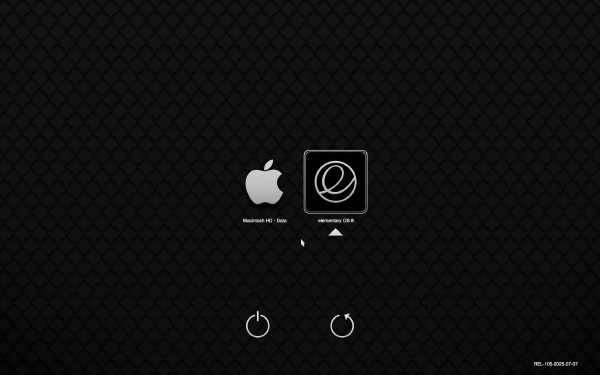
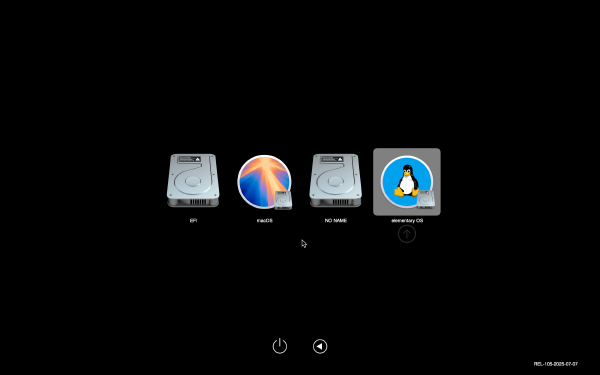
Some Macs running Linux hang when waking up from sleep if the Ethernet port was connected. Fix this problem by automatically disabling/reenabling the drivers when the machine goes to sleep.
I am happy to announce a new release of my new book “Learning Hammerspoon”, including a brand new chapter Hammerspoon Cookbook, Tips and Tricks and many other improvements.
As I’m taking notes or writing in Org-mode, I often want to insert screenshots inline with the text. While Org supports inserting and displaying inline images, the assumption is that the image is already somewhere in the file system and we just want to link to it. In this post I will show you how to automate the insertion of images from the clipboard into an org-mode document.
I am happy to announce the first release of my new book “Learning Hammerspoon”, a book devoted to using Hammerspoon to make using your Mac easier, faster and more fun.
Hammerspoon’s configuration files are written in Lua, so a basic knowledge of the language is very useful to be an effective user of Hammerspoon. In this two-part article I will show you the basics of Lua so you can read and write Hammerspoon configuration. Along the way you will discover that Lua is a surprisingly powerful language.
Here’s how to fix the breakage caused by one of the recent updates to Microsoft Outlook in the Outlook-to-OmniFocus AppleScript included with my SendToOmniFocus spoon.
In this second article about Hammerspoon, we look into Spoons, modules written in Lua which can be easily installed and loaded into Hammerspoon to provide ready-to-use functionality. Spoons provide a predefined API to configure and use them. They are also a good way to share your own work with other users.
This is the first installment of a series of posts about Hammerspoon, a staggeringly powerful automation utility which gives you an amazing degree of control over your Mac, allowing you to automate and control almost anything. In the word of Hammerspoon’s motto: Making the runtime, funtime.
via https://medium.com/@mrdoro/fast-translation-with-google-translator-and-mac-osx-817e32233b7a
https://medium.com/@mrdoro/fast-translation-with-google-translator-and-mac-osx-817e32233b7a Nice article about how to create a service to automatically translate selected text from any application. I use this all the time, I have a “German-to-English” service bound to Command-Alt-Ctrl-Shift-E, so I can just select text off the screen, press the shortcut, and a window with the translation will pop up. Very handy.
via http://sixcolors.com/post/2015/10/apple-magic-trackpad-2-review/
This is probably old news for most, but it still blew my mind: only now I realized that the clicking feeling and sound on my MacBook Pro’s trackpad is artificially generated. I did the experiment of turning on “Silent clicking” and turning off “Force click and haptic feedback” on the trackpad preferences panel and, indeed, the clicking is gone. Wow (/ht @jsnell) To aid in the process, the Magic Trackpad apparently even generates its own artificial clicking noise (as the Force Touch trackpads in the MacBook and MacBook Pro do). If you think that’s weird, you can enable Silent Clicking in the Trackpad system preferences pane, and the artificial sound will shut off. (There’s still a sound when you click, though, thanks to the vibration—but it’s much subtler.) As on the MacBook, it’s kind of hard to believe that the Magic Trackpad 2 isn’t actually clicking when you push down. The glass does flex with the pressure a little bit, but that clicking feeling is entirely artificial.
I started getting errors from the TRAMP Emacs package because I was using fish as my default shell, and it does not recognize certain standard syntax elements (such as && to separate commands), and Emacs runs subcommands under the default shell. I fixed this by:
I’ve been working on cleaning up my Evernote, and noticed that I have a lot of tags assigned to a single note. I had successfully used Veritrope’s excellent Evernote empty tag remover applescript, so I made some small changes to write the attached script, which will find all single-note tags in your Evernote and list them in a new note, including links to each note. This makes it much easier to go through them and see which of those tags could be removed. Just download the script, open it in Script Editor and run it. Tip of the hat to Justin for his excellent collection of scripts at Veritrope!
If you are using docker on Mac OS X using boot2docker (http://docs.docker.io/installation/mac/), you may see truncated output from docker run, and also may have noticed that docker attach does not work properly, producing only some output and then exiting. This bug is documented here: https://github.com/boot2docker/boot2docker/issues/150, where I also found the following workaround. Documenting it here in case anyone finds it useful:
I’d been having for some time a problem with `com.apple.dock.extra` appearing in the “Apps using significant energy” section of the battery menu. I just learned the solution (from http://forums.macrumors.com/showthread.php?t=1651662): remove BusyCal 1.6 (I upgraded to BusyCal 2, but left the old version around in case I had to go back to it). After removing it and restarting the Dock, the problem stopped. From the same thread, it seems the problem was caused by BusyCal’s “animate transitions” preference. I didn’t try that, but if you are still using BusyCal 1.6 and have this problem, it’s worth trying.
Evernote introduced some time ago an "Insert Date" keyboard shortcut, which is very handy. However, the options for the format of the inserted date seemed limited (only four options). I finally learned how this works, and how to change it on the Mac. The formats offered are those that are configured in the "Languages & Text" preferences panel. If you go to "Region" and then click the "Customize button" in the Dates part of the panel, you will see and be able to customize the formats for short, medium, long and full date representations. Those are the options that are offered to you by Evernote. Just change them to whatever you want, and they will be available for selection. What I specifically wanted to do was to use the YYYY-MM-DD format, so I changed it to the following:
After using Sparrow for a while, I have decided to switch back to Mail.app. However, even after setting my default email client to Mail.app, all my message: links (for example, from messages dragged from Mail.app into Things) were opening in Sparrow.
Yesterday my external Western Digital disk (which I use for Time Machine, among other things) stopped mounting automatically when I plug it in. This may *cough*definitely*cough*have something to do with me unmounting it forcefully while it was doing a backup, since I was in a hurry.
Cfengine (tested 3.2.0) installs easily on OS X (tested 10.7), given that it's Unix. One problem I encountered was that it does not compile with the bundled version of Berkeley DB (it recognizes it during configure, but produces compilation errors). The solution is to use some other DB engine. I chose Tokyo Cabinet. Using homebrew, the process is simple
I just finished upgrading our Mac (my wife and I share it) to Lion. It looks very nice. This has been the OS X upgrade to which I have given less thought: purchase, download, backup, install, done.
I want to post a short update aimed at users of my iPhoto plugin CopperExport. I have received multiple reports of it failing in recent updates of Snow Leopard, and I have also verified personally that it does not work properly in iPhoto'09.
Unfortunately, since the big move, I find myself without easy access to a Mac for development (I had a Mac at my previous job, and I use Windows at my new job), which pretty much makes fixing these bugs impossible. Until I get a new machine, I will not be able to provide updates to CopperExport. Of course, if any developers out there want to make the appropriate fixes, I will happily accept patches that you submit, and produce a new release myself.