
I have been using Thinking Rock for a while to manage my GTD process, and I really like it. Today, after a long wait, version 2.0gamma has finally been released, at least for the Mac. So as soon as I got home, I downloaded and started playing with it. Here is my initial set of impressions, including some screenshots. This is just from very early testing, mainly for the purpose of sharing some screenshots, so many of my impressions may be wrong, and this is not a final release yet, so some things may change or get fixed.
My veredict: it seems to have been worth the wait. Good work Jeremy and Claire!
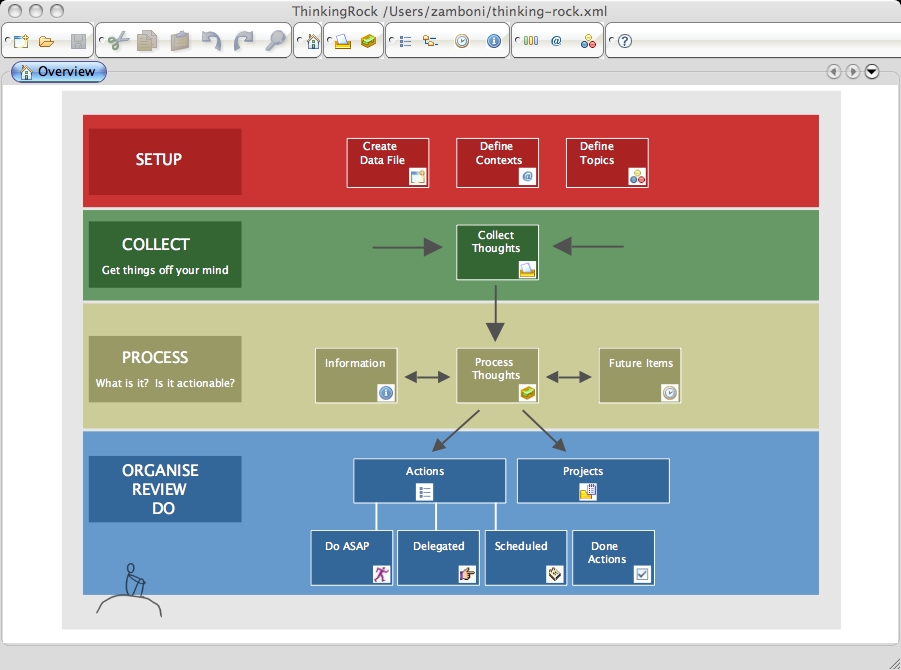
I downloaded TR2, installed it according to the instructions (which copy a couple of jar files into /System/Library/Frameworks/JavaVM.framework/Versions/CurrentJDK/Home/lib/endorsed, I wonder if this could be fixed so that the jars are accessed at their location inside the application, to avoid installing things outside the app bundle), and started it. The well known overview screen welcomed me (click on the images to view them in their original size).
I opened my existing TR data file from version 1.2.3, and it imported it perfectly. Let’s walk through the typical GTD process. First, you capture thoughts.

Then you process them. Here is the first place where I noticed some changes. Now you can attach files or URLs to actions, and you have some additional fields for the action, such as time it will take to complete (more on this later).

You can now also set recurring actions. When you set an action to be “Scheduled”, you can also set its recurrence characteristics.

Once you process the thought, it ends up in your actions list. In my example, I made a project out of it, so it ended up in the projects list. In version 2.0, the projects list shows only the projects by default. If you double click on a project or action, you get to see and edit its details.


Speaking of clicking, TR2 feels considerably faster than version 1.2.3 in switching between views. Also, in general the interface seems better organized and more pleasant to look at. Keyboard shortcuts are still a bit odd and not consistently available. For example, if you have an action selected in the projects list, you cannot create a new action, you have to select a project first. I think if you have an action selected, “Add action” should add a new action in the enclosing project (actually this was the case in version 1.2.3). Speaking of keyboard shortcuts, I hope they are customizable, although I didn’t find an obvious way of changing them.
A nice addition in the projects screen is the “Future projects” tab. I was not able to drag a project into that tab, but I was able to cut-and-paste it into it.

Also intriguing is the “Templates” screen. In it, you can create projects and actions, arguably to use them as templates when creating new ones. However, I could not find a way to specify a template when creating a project or action, other than copying and pasting it.

I normally spend most of my time in TR in the “Review actions” screen, in which you can filter by context, topic, status, etc. Now you can filter by many additional criteria, and also choose which columns and filter options are displayed (very nice!). One nice addition is the ability to display and sort by creation time. Allows you to see which actions have been lingering there for too long. Ouch, I suck.


The “Done” tab in the actions screen currently shows up empty.

The “Future” and “Information” items screens have also been redone, now you can independently set topics for them. You still cannot create items directly from these screens, only by going through the “process thoughts” screen. While this is Ok by strict GTD methodology, I think it would be nice to be able to skip that step sometimes.


Now on to other new things. There are now three additional fields for each action: Time it will take to complete, Energy needed to tackle it, and Priority. I particularly like the Time, since I have for some time named my actions by prepending to them the time I estimate it will take to complete. I am not sure if the availability of the Time field will stop me from doing that, but it’s a very nice addition. For each criteria, you can define the available values, and you can also choose to show them or filter by them in the actions screen.


With version 2.0, Thinking Rock is now a modular application, and new modules and plugins will eventually be available. So there is now a Module Manager for viewing, installing and uninstalling modules, and an Update Center wizard that allows you to automatically download and install new or updated modules. The Update Center popped up with a new “Test module”, but didn’t do anything, so I guess some of the backend infrastructure is not there yet, but this is definitely a very nice feature.


It’s also worth mentioning that with version 2.0 (although not as of this writing), TR will become open source. I am sure that this will result in many interesting modules being created, and (I hope) considerable growth of the ThinkingRock user community.
The Preferences screen has also been redone. In the basic screen we get essentially the same options as before, with the addition of recurrence defaults. But there is also an Advanced Preferences screen, where you can set many low-level details, including the content of menus and toolbars, proxy settings, confirmation settings, etc.


You can now select which toolbars are visible, and also customize or create toolbars.

I have not played much with reports yet, but most of the reports I’m used to seem to be there.
There is now an archival feature, which allows you to save projects and actions done before a certain date to a separate file (to keep the size of your main file down, I guess).

Whew. So that’s it for now. I hope I gave you an impression of what to expect. Overall, in my 2 hours of playing with it, TR2.0 seems like a solid release. I was already impressed by the previous versions, and the new one seems to maintain the tradition. It includes some very nice features, and I am really looking forward to seeing it as open source. I would like to commend the Thinking Rock people, Jeremy and Claire, for their great work, for their always polite, friendly and useful responses in the forums, and for patiently putting up with all the “when do we see 2.0?” comments from impatient users like me.
Technorati Tags: gtd, productivity, software, thinkingrock
27 responses so far ↓
1 G Milner
// Apr 12, 2007 at 2:49 am
G Milner
// Apr 12, 2007 at 2:49 am
Very nice review. Good screen shots. Thanks.
2 Tony
// Apr 12, 2007 at 4:32 am
Tony
// Apr 12, 2007 at 4:32 am
Great and speedy job on the review. As a TR Windows version user mostly (for my work projects), you convinced me not to wait and start using the Mac version @home. Many thanks.
3 Joe Fernandez
// Apr 12, 2007 at 8:49 am
Joe Fernandez
// Apr 12, 2007 at 8:49 am
Thank you! I was dying for screenshots of TR 2.0, and now I’m feeling better. ~~ Once again, however, I am finding myself a little jealous of Mac users for their access to cool GTD tools. I anxiously await the Windows release and will begin plotting development of a TR plugin to synchronize TR Actions to Outlook Tasks.
4 Revue et photos d’écrans de Thinking Rock 2.0 at #doesNotUnderstand: // Apr 12, 2007 at 10:26 am
[...] Zamboni a eu le temps de tester la version gamma ThinkingRock 2.0 qui est sorti hier. De très nombreuses photos d’écrans montre les nouvelles [...]
5 Richard Brand
// Apr 12, 2007 at 1:39 pm
Richard Brand
// Apr 12, 2007 at 1:39 pm
Great review, thank you.
6 Richard Brand
// Apr 12, 2007 at 1:39 pm
Richard Brand
// Apr 12, 2007 at 1:39 pm
Great review, got me salivating for the Windows release.
7 Ron Bell
// Apr 12, 2007 at 3:40 pm
Ron Bell
// Apr 12, 2007 at 3:40 pm
Nice review. The ability to set recurring actions is in itself worth an upgrade once TR2 leaves the pre-release stage.
One item which wasn’t immediately apparent from your discussion of filtering is that TR2 supports searching, which was a BIG feature lacking from TR 1.2.2.
8 Hitchhiker
// Apr 12, 2007 at 3:44 pm
Hitchhiker
// Apr 12, 2007 at 3:44 pm
Thanks for all the comments!
Ron – you are right, I forgot to mention the new search feature, which is indeed a very nice improvement.
9 N Aiels
// Apr 13, 2007 at 9:07 am
N Aiels
// Apr 13, 2007 at 9:07 am
Great review, I personally can’t wait until I’ll be able to get my hands on the latest windows release of TR 2.0!
10 Sylvain v2.0 » ThinkingRock passe bientôt la seconde! // Apr 14, 2007 at 12:21 am
[...] quelles nouveautés pour cette nouvelle version? Je vous encourage à lire la petite revue de Zzamboni. Pour résumer rapidement cette revue, voici les principales [...]
11 James Watson
// Apr 16, 2007 at 3:50 pm
James Watson
// Apr 16, 2007 at 3:50 pm
Excellent review, can’t wait for the windows version.
How about an online collaborative version in v3?
James
12 Thinking Rock 2.0 — El Canasto // Apr 18, 2007 at 10:43 am
[...] para todos los usuarios de OS/X sin miedo para versiones gamma. Diego Zamboni lo ha instalado y escribo en su blog sobre todos los novedades en este versión: la posibilidad de adjuntar ficheros y URLs a acciones, [...]
13 Ben Dearnaley
// Apr 18, 2007 at 11:31 pm
Ben Dearnaley
// Apr 18, 2007 at 11:31 pm
Looks Great. Shame I have to wait for the windows version – looks like it’s gonna be worth it though!
14 Organize IT Recap 22nd April 2007 » Advice on organized and productive living through lifehacks and GTD » Organize IT // Apr 22, 2007 at 3:00 pm
[...] talked about Thinking Rock in a recent recap and while I have yet to try it, I came across this review which provides some good insight into how it [...]
15 My Get Things Done List » Blog Archive » Organize IT Recap 22nd April 2007 [Organize IT] // Apr 23, 2007 at 6:14 am
[...] talked about Thinking Rock in a recent recap and while I have yet to try it, I came across this review which provides some good insight into how it [...]
16 hardyoyo
// Apr 23, 2007 at 8:34 pm
hardyoyo
// Apr 23, 2007 at 8:34 pm
I notice the appearance of two tiny new buttons in the process thoughts screen. They look suspiciously like back and forward buttons. Crossing my fingers that’s the case.
17 Thinking Rock 2.0 « Die Kritiker // May 3, 2007 at 3:00 pm
[...] habe es mir noch nicht angeschaut, aber BrT hat bereits 2 Stunden damit hantiert und findet es [...]
18 Kolz Blog » Blog Archive » Thinking Rock 2.0 released // May 5, 2007 at 1:40 pm
[...] for the Mac! I own a PC, but this must mean the Windows version is not far away any more. BrT wrote an excellent review on the new version and I must say, promising new features. One thing I especially look forward to [...]
19 Nützliches Denkzeug “Thinking Rock” | Innovation Wings // May 7, 2007 at 2:11 pm
[...] kann. Die aktuelle Version ist 1.2.3. Von der Version 2.0 ist ein Gamma-Release verfügbar, der nützliche Funktionserweiterungen erhält. Im ersten Testbetrieb auf Windows lief diese Version [...]
20 Shared Memory » Blog Archive » Thinking Rock Version 2 // May 13, 2007 at 6:35 pm
[...] 2.0. Sie enthält viele Verbesserungen die ein wenig Feinschliff in den GTD-Workflow bringen. Im BrT-Blog könnt Ihr einen interessanten Bericht über die Verbesserungen der Version 2.0 [...]
21 How I Get Things Done « Ben Kraal: making the ordinary // May 14, 2007 at 4:21 am
[...] a Gamma release of 2.0 which by all accounts is also stable enough to use. There’s already a nice and long review on-line of 2.0 which does a better job than I will of explaining the [...]
22 My Get Things Done List » Blog Archive » Thinking Rock 2.0 released [What's the next action] // Sep 2, 2007 at 6:06 am
[...] for the Mac! I own a PC, but this must mean the Windows version is not far away any more. BrT wrote an excellent review on the new version and I must say, promising new features. One thing I especially look forward to [...]
23 ThinkingRock + (Modded) PocketMod = the HipRock | GearFire Student Productivity // Sep 26, 2007 at 3:39 am
[...] can read a review here. Suffice to say, ThinkingRock is made by GTD’ers for GTD’ers. The main features that [...]
24 Mike Perry
// Sep 27, 2007 at 12:21 am
Mike Perry
// Sep 27, 2007 at 12:21 am
Any chance of someone doing a video review and posting it to YouTube? Screenshots are fine, but it helps to be watching someone go through all the steps to using it. I downloaded the 2.0 version and found the Java interface confusing and un-Macish. That said, I’d be willing to learn if this application is as handy as some says it is.
25 Hitchhiker
// Sep 29, 2007 at 12:32 am
Hitchhiker
// Sep 29, 2007 at 12:32 am
Mike: the Java interface is definitely not “Macish”, that’s one big problem of TR on the Mac. I don’t know of anyone who has done a video review, but it’s not that hard to get around the app. Start by capturing some thoughts, then go to the process thoughts screen, and convert them into actions and projects. As you go, you can also customize your contexts, priorities, etc. It requires a bit of playing with it, but it is worth it once you get it set up.
26 Hitchhiker
// Feb 2, 2008 at 8:51 pm
Hitchhiker
// Feb 2, 2008 at 8:51 pm
I’m closing comments on this post due to spam.
27 Organize IT Recap: Make Your Offline Life Easier, How To Be A Happy Introvert And Why We Can’t Always Break Bad Habits - Practical advice on personal development, productivity and GTD // Jan 2, 2009 at 6:21 pm
[...] but I did find it’s simplicity appealling. If you are interested in going hi-fi, check out this detailed review for an in-depth look at [...]